Showing posts with label Cameo Silhouette Projects. Show all posts

Monday, 7 May 2018

Mrs Frizzle Practice

I am busy working on two crochet projects at the moment so haven't been fitting in anything else of late until today when I settled down and made this recycled card.  

I had a rather lovely card for my birthday last month from my brother and was reluctant to just throw it in the drawer where I tend to keep most cards I adore.  No, I had an idea almost immediately on how I could re-use the elements on this card.

I realised that the Craftwork Cards Texture Pad was going to make very similar background that the existing card had so I cut out the butterfly so I could adhere it onto the card.  I also re-used the side panel and made a tag from part of the original card.  I had some lace rub-ons that I had had for many years and though this was the appropriate time to use these.  

Since the original card had the wording sister on it and I wanted to the words "Happy Birthday", I purchased the Mrs Fizzle Practice" font from the Silhouette Design store and then used a sketch pen to write on the texture card.  It was straightforward from here on in, just a case of sticking all the elements back together again and writing a sentiment for the inside.

Here is the finished card which I am very pleased with.


Sunday, 11 February 2018

Valentine Cards

It doesn't bother me that Valentine's Day is commercially driven as I like the fact it is a way of celebrating the love we hold for someone special in our life.  I therefore take pleasure in making Valentine Cards for this occasion and this year is without exception.

The dust cover of the Cameo Silhouette came off during the week and I spend an evening playing with my software and then cutting out my designs for this year's cards. 

After a couple of evenings work these are the cards I made:


Sunday, 17 September 2017

Tri fold card with butterfly bracket

I am sharing cards that I have made using my Cameo Silhoutte machine which gave me a chance to use some of my small card toppers.

I like the concept of unwrapping the card before you see the picture as it turns it into a gift card.

The brackets have been decorated with a product called "Hearty Soft Clay" which is lightweight and easy to transform with acrylic paints watercolour pens.  I used my Sparkle Pens on these particular ones.  The molds are from Katy Sue Designs.


I hope you enjoyed looking at these cards.

Sunday, 2 July 2017

Paper Lanterns

Paper lanterns are a great alternative to using real candles especially if you have young children or pets.  You couldn't leave out candles in my household in any event, not with our cats. They love to chase each other around the house and you never know what is going to go flying.  Our cats recently celebrated their first Birthday.  They still get on really well together and only the other day they were snuggled up together on the sofa.
  
Yesterday was a first for my lad Milo.  I was sat in my craft room watching television and he jumped up on my lap and stayed a good five minutes for a cuddle.  I think he sensed something was up because I hadn't gone downstairs for the evening to watch tv because my hip was too sore.

Anyway, the purpose of my blog is to share with you one of my latest makes - paper lanterns.  These were made using my Cameo Silhouette, some cardstock, vellum and battery operated lights.  The images are available in the Silhouette Design Store if you would like to have a go at these you will also need a Cameo Silhouette.


Sunday, 18 June 2017

Piano Card with Orchid Flowers

Hi everyone, I hope you are all enjoying this lovely spell of weather we are having.  I have been spending some time upgrading the software on my Cameo Silhouette and getting my head around the new look.  I have also updated the firmware software on the actual machine and rather proud that I managed all this without any technical support.

I haven't used my Cameo Silhouette since my fall because it requires pulling things out and re-arranging the space around me.  The same can be said for my cardmaking really.   I find it difficult to get at what I want most of the time, which isn't helped by the fact that I have a lot of stuff, however, this doesn't mean I don't craft, I just try and keep it simple.  Mostly I spend my hours working on another blanket I am crocheting as an heirloom for my hubby.  I am two weeks away from finishing so I am not in a position to share it with you today. 

What I interested in making at the moment are paper flowers.  I made some orchids a few weeks back and today I knew what I wanted to do with them.

Using my Cameo Silhouette I downloaded a template for a piano card, resized it and then cut it out.  Then I decorated it with the orchids and used 3D gel to stick them on.

Here is the end result which is waiting for a sentiment to match the occasion.  I hope you like it.

Best wishes, Crafty Tash


Sunday, 29 January 2017

Valentine Cards

The first two projects came about from the need to use up some images I had from a craft papercraft kit.  

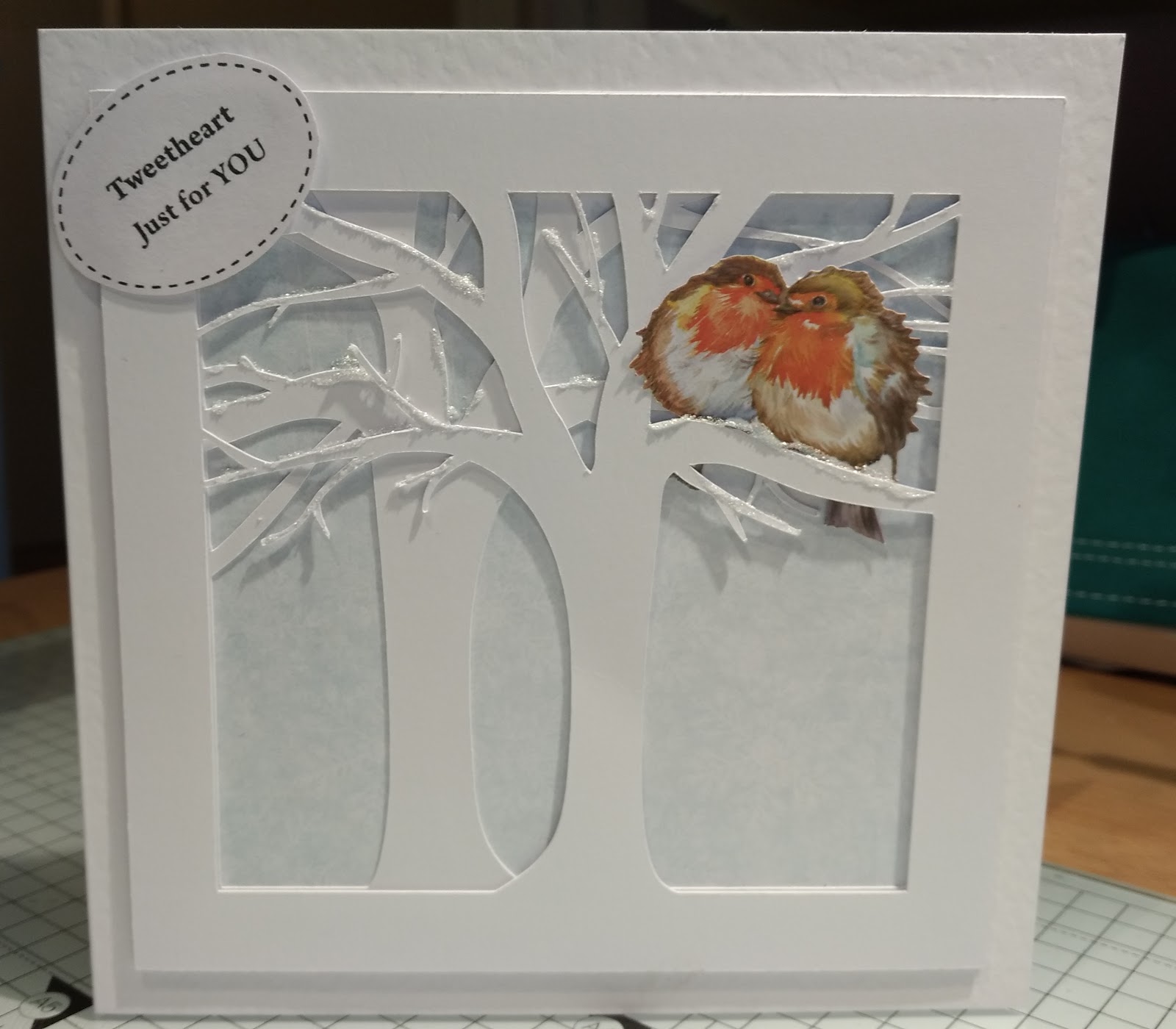
I thought both the squirrel and robins needed a tree.  As I didn't have a tree die large enough it was a case of searching in the Silhouette Design Store for something suitable and I came across this tree template. I liked the way the tree was formed and looked very natural.  I resized the image to fit my 7x7 card and then cut out on Cameo Silhouette.

Here is the first card I made for the robins.


and this one for the squirrel.  I used the Silhouette software to create the speech bubble and the Sketch pens to write the sentiment.  I was going to make a few of these sentiments but the software kept crashing so I quit whilst I was ahead!


Here are some more cards I have made with the Cameo Silhouette.


I designed this image in the Silhouette Software.  I couldn't decide whether to add a sentiment but decided that the design spoke for itself.


This is another design I created using the Silhouette software and then embellished it with tiny red hearts.  The design was one that caught my eye on Pinterest.


And another, which can be quite easily personalised by choosing a specific area of a map relevant to you.

Sunday, 27 November 2016

Christmas Winter Wishes

I have a fab winter wreath to use with my  Cameo Silhouette.  Here I have re-sized it to fit a 7x7 card and a Tonic Winter Wishes die to add a sentiment in the middle of the card.


This second one was done in cream cardstock and a pretty blue background.


It is one of my favourites, what do you think?

Sunday, 20 November 2016

Cameo Silhouette made Christmas Cards

I have some designs from Lori Whitlock to use with my Cameo Silhouette I purchased in the Cameo Silhouette Design Store.

These were currently sized to fit a card that is 5.5 x 5.x5 which isn't a size I use so I decided to resize them to fit my existing 6x6 cardstock.  This would also mean I wouldn't have to cut a card to place the elements on as I could use my existing stock.

In order to achieve this I drew a line that was 6 inches in length.  I then grouped all the elements and resized them as a group image by placing the 6 inch line against the element that is the card template and then was able to tell when it was the correct size.

The first is "Oh Holly Night".


Followed by a happy Santa wishing you a Ho, Ho, Ho at Christmas.


  Lori called this style of card a "pop up" card but I didn't think that was what we would call it in the UK. 

If anybody knows the style of this card, please can they let me know, thank you.

Sunday, 30 October 2016

Kitten Birthday Wishes

I made a Birthday for someone special recently.  I wanted it to be flat and have a kitten theme to reflect the card was from us all.

I used my Cameo Silhouette to make stitch markings on my Craftcard and Sketch Pens to write Happy Birthday.  I then cut some cardstock to make part of the balloon to which the kittens are holding onto.  The kittens were cut out in black cardstock with dies from my crafty stash.


Sunday, 25 September 2016

Owl always love you

Now that I have stopped making Christmas Cards for a moment I have a card to share with you that was made using my Cameo Silhouette.  The design was downloaded from the Silhouette store and then resized accordingly.  The background was created using one of my favorite Tattered Lace embossing folders that has a woodland theme about it with owls of course.
Owl always love you

Sunday, 17 July 2016

Paper cutting with the Silhoutte

I am really keen on the idea of trying papercutting.  I have been collecting inspiration on Pinterest.  However, instead of cutting out with a scapel, I plan to use my Silhouette to make all those intricate cuts for me.  All I have to do is design something!

Okay so lets start with something simple that involves joining (or welding as the term is known) several elements together.


I start with a heart shape.  I only need the outer edge so I create two.  I place the smaller one inside the larger one and when I weld them together and now I have what I need for the edge of my papercut.

Next I try different fonts until I find a font that will look good when I nudge the letters close up and then weld together.


Next I play around with different leaves and flowers but finally settled on one image that I particularly like.

I then resized it to fit inside the heart and found a spot where the text would fit in the available space.  The text, flower and heart shape were welded together and this is the end result.  I have framed it so it can go on the wall.


Sunday, 10 July 2016

Papercraft Garden Bench

I don't mind a challenge, especially if I think it is achievable.  Despite still being a novice with my Cameo Silhouette I have produced some stickers for a local choir and recently set myself a  challenge of making a 3D garden bench.  This came about because I didn't want to wield a scalpel!

I had been inspired by a bench that Neil Burley had made for Craftwork Cards.  It was one that started out as a window box card.  Paul saw beyond this and created a sweet little bench.

I too could have made one with the window box cards but as soon as I set about using my scalpal I knew I would not be able to do a very neat job.  This is really a job for the Silhouette.

I wanted my bench template to be cut from cardstock no larger than a standard A4 size of card as this is what we all have to hand.

I had a go at creating my trellis panels for the back of the seat.  It took the longest time.   After a few alterations to the design and template I came up with this little beauty. Now it may have taken me 4-5hrs to perfect and a few minor tweeks to each version before I was content with the design, but I have to say I am very pleased with it and inspired enough to have a go at making an edge-able card next.


Well, what do you think?

Saturday, 11 June 2016

Wedding Bells Lantern

I am trying to make a point of making Monday's my "Silhouette Monday Day" so I will keep developing my skills and knowledge of this machine and software.  

All was going well, I have had my machine since March and getting on well with it.  That was until it started crashing when I needed to use the text tool.  It became so bad that I couldn't use it without it crashing on me.  Fortunately the American owned company were very helpful and sent me some helpful instructions.  After a download of the latest version and some deletions of files, fingers crossed, it seems to be working fine now.  

So to my next project that has come about because I have a wedding invitation to an evening reception this evening and wanted to make my own card and gift.  The gift I have made is miniature bunting that is wrapped around a large cotton reel. Here it is wrapped around the cotton reel.  I preferred the cotton reel painted with some vintage chalk paint so I have now painted it (see below).


As you can see the bunting spells out "Mr & Mrs".


I then made a box to put the gift in using my Cameo Silhouette and a flourish card with the words Mr & Mrs across the front.  Both designs were purchased from the Design Store for 0.99$.  

It was nice to be able to finish off the inside of the card using the text tool, without it crashing on me!  The Wedding Bells Lantern was slightly enlarged before cutting on the Silhouette so that the cotton reel would fit inside it.  The panels were cut from vellum.


Saturday, 16 April 2016

Upgrading to Designer Edition


I am so excited as I have just created my first doily using my Silhoutte Cameo.  For £20 I upgraded to the Designer Edition and now I have more tools at my disposal.  I have just been looking into all the benefits of having upgraded so I am using this post as an exercise to illustrate what I can now do. I would like to thank the Silhoutte School for the tuition.

The Designer Edition offers a wide range of sketch pen options that are not available with the standard software.  Plus there are ways to fill in a sketch design to make it look like pencil, charcoal, scribble and so on.


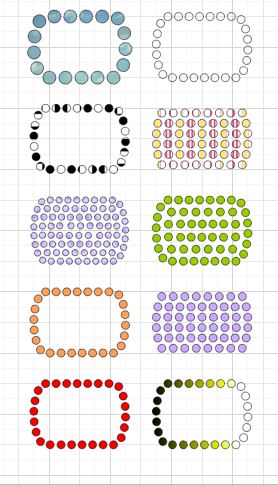
Another benefit to upgrading to the Designer Edition has to be the Rhinestone feature. With a click of a button you can turn any design into a rhinestone design.  


There is a tool for putting a shadow behind your text.

The eraser tool options enable you to pick the shape and size of the eraser and use it create designs and patters.  My favourite element is manipulating the eraser so the design stays open or becomes a closed shape which give you more design options.


The knife tool has lots of options now.


The Shear tool looks fun as it lets you move designs to different angles.


Making the doily was possible by using the ruler and grid as I was able to use the crosshair feature and snap the guides to the centre of the circle.


The time I will save by using the nesting option and it will also save card when cutting as it makes best use of the space available.


The transfer properties tool will allow me to fill another shape with a colour or pattern already use.


I will be able fill a shape with a picture or pattern.

And finally, I have the ability to use SVG files.

What's not to like about upgrading to the Designer Edition.

Monday, 7 March 2016

What can I make with my Silhoutte Cameo

Well they say the possibilities are endless and I am inclined to believe this.  The cameo has a 12x12 cutting area which is perfect for creating scrapbook pages and it does a lot more besides.  

I toiled for weeks over whether to purchase a Brother Scan and Cut, a Cricut or this machine and opted for this little beauty because it offers the crafter the most flexibility in the way they want to craft.

Now that I have my Cameo I can cut elements for my cardmaking to whatever size I require unlike the conventional way with dies. 

I can cut around my own stash of images or those available in the Design Store with the option of cutting around the edge or adding a slight border.  I can even turn my craft stamps into images for printing.

Vinyl decor is becoming a popular way to decorate your home and with this machine it is easy to cut and length is not an issue.   

Changing the blade to a sketch pen adds the drawing element.  My cameo will also cut fabric and heat transfer material meaning I could design my own tee-shirts and do etched glass.

This machine will revolutionize the way crafters craft in the near future.

Since my Cameo arrived on Saturday I have been getting acquainted with it.  It wasn't as hard as I expected to use and already I have created a couple of tags, cut out an element for a card and made a card.  All easy to do through online tutorials available on YouTube and Craftsy website.

Here is what I have made in the first 24hrs of using it.


First I cut a tag which was available as a free image with the Design Studio software.  All I had to do was re-size appropriately before cutting out.  

I wanted to use my Foundation Card which I purchased from Joanna Sheen's website.  It is the same card used by Creative Expressions and is 200gsm. All I needed to do was place the cardstock onto the 12x12 cutting mat and load this into the machine. I used a blade setting of 4, one up from that recommended, due to the weight of the card.

I left it on the mat after the initial cut because I then wanted to sketch the hearts onto it and would reload the mat when I was ready. This would ensure the hearts were drawn where I expected them.

The next stage was to add the sketched image (again free with software) to my tag and then switch my blade out and replacing with the sketch pen before sending it through the machine again.

What I have learned from this experience is that you can identify different areas of an image to cut, or not cut so it means you build the complete card then select what you want to do with it at the end.  i.e. select the area you want to cut or sketch.


This time I created a tag from scratch by drawing a rectangle and a circle and welding them together to create one uniform shape.  I then added the word "love" to the edge of the tag and welded that together.   Finally, I wanted another go at the Sketch Pen so I added a word "you" in the middle.


Here is one of the free images I chose to cut out.


And here is my first purchase.  This Easter Egg image was 65p.  Much cheaper than purchasing a die and as I said before, I can make this to any size within the parameters of my 12x12 cutting mat.


and finally this was the last project of the day.  Here I cut direct onto an 8x8 card which was quite heavy so I set the cut speed down and checked the box for a double cut.